Health tracking feels better when it records effort instead of only outcomes. RepGraph keeps the commitment legible: protein, a workout, and steps become one daily score and one visible mark.
← Back to home
RepGraph · Product identity
Protein, workouts, and steps on one contribution graph.
RepGraph turns three daily inputs into one score so consistency is visible at a glance. Log protein, complete a workout, add steps, and watch those daily commits accumulate over the year.
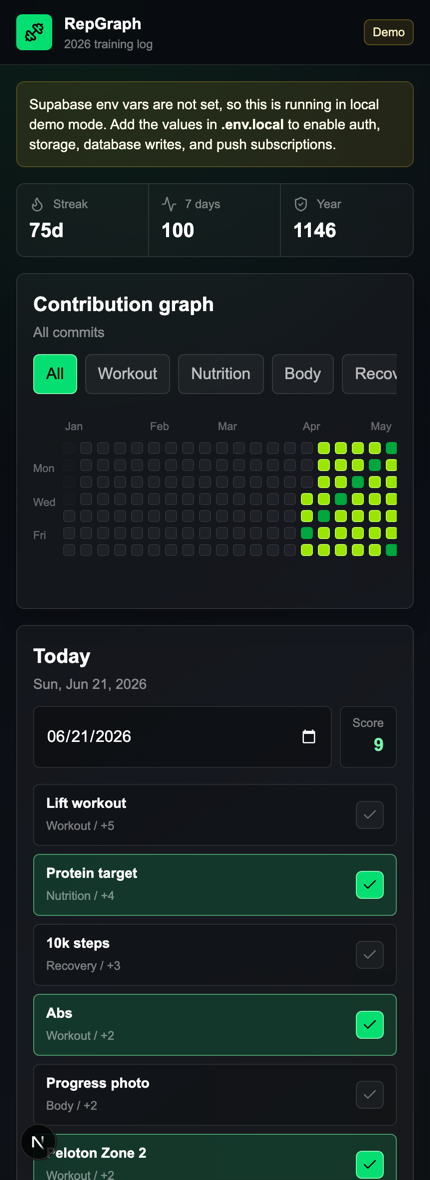
The app is designed for one quick phone check-in: enter protein and steps, mark or log the workout, save the day, and move on.
Production creates an anonymous Supabase session and stores the entered email only as an unverified label. Clearing browser data can lose access, so the current flow is intentionally lightweight.
Daily loop
Small commits, logged before they disappear.
Protein
Enter the day's protein count against the visible target.
Workout
Mark training complete or record the workout session.
Steps
Enter or paste the day's step count.
Score
Combine the three inputs into one bounded daily score.
Review
Use recent charts and the year graph to see consistency.
Product shape
One daily score for consistency, not another dashboard to babysit.
Protein contributes up to four points to the daily score.
A completed workout contributes five points.
Steps contribute up to three points.
Recent charts keep each input visible without changing the core score.
The year contribution graph turns daily effort into a legible history.
Without Supabase environment variables, RepGraph uses seeded protein, workout, step, and score history so the complete daily loop remains inspectable.
The email is a label on an anonymous browser session, not a verified login or recovery address. The interface says so before the user begins tracking.
Optional PWA reminders stop once protein, workout, and steps are complete for the day instead of creating more tracking noise.